FLIPCLOCKTALK
A flip clock that says the time out loud.
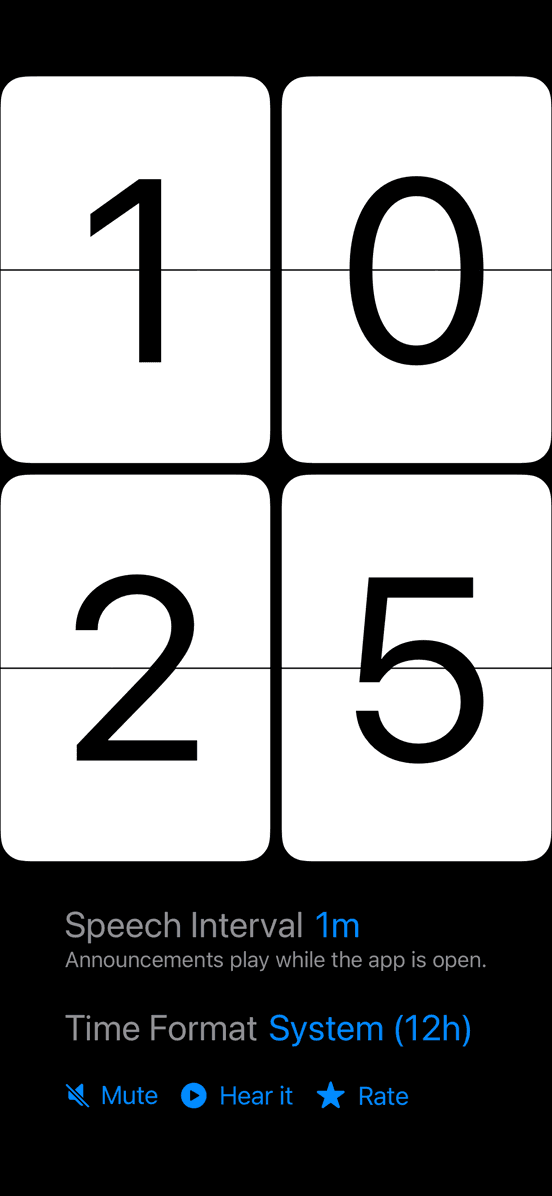
FlipClockTalk turns your iPhone or iPad into a large flip clock and says the time out loud on a schedule you pick, from every 15 seconds to every hour.
You can hear the time without looking at the screen. Tap Hear it to hear it right now, and Mute or Unmute with one tap.
Announcements play while the app is open, and the screen stays awake while it is, so it also works as a table clock.
FOR WHEN YOUR HANDS OR EYES ARE BUSY.
- — Cooking or baking
- — Workouts and exercise
- — Getting ready to leave
- — Studying or focused work
- — Meditation or relaxing
OTHER FLIP CLOCK AND TALKING CLOCK APPS.
Flip Clock: Digital Desk Widget
A flip clock with Lock Screen and Home Screen widgets, a StandBy mode, themes, alarms and an hourly voice or sound chime. Free to download.
Pick it if you want the clock on your Lock Screen and in StandBy, with alarms and an hourly chime.
Fliclo and Zen Flip Clock
Full-screen flip clocks with Pomodoro focus timers; Fliclo also shows local weather. Free to download.
Pick one of them if you want a focus timer next to the clock.
TalkingTime: Speaking Clock
Spoken time announcements and chimes on a schedule, with notifications. Custom schedules need its Pro subscription. Free to download.
Pick it if you want announcements that can sound when the screen is locked, or chimes instead of a voice.
Chime : Speaking Clock
Speaks the time with one of 10 voices, or plays one of 30+ chimes, every hour, half hour or quarter hour, with quiet hours. It uses notification sounds, so it keeps ringing when the app is closed. Free to download.
Pick it if you want announcements while the app is closed, or a chime sound.
ClockChime – Speaking Clock
18 full-screen clock faces, including a split-flap flip clock, with a spoken hourly or half-hourly chime, a focus timer and nature sounds. Free to download.
Pick it if you want lots of clock faces or a focus timer. FlipClockTalk can speak as often as every 15 seconds.
Voice Clock : Time Speaker
Speaks the time at intervals as short as 1 second, in 15+ languages, with your own recorded voice or audio, and runs on Apple Watch. Free to download.
Pick it if you want a language other than English, your own voice, or announcements on Apple Watch.
Voice Clock: Talking Clock
Says the time on the hour or every 30, 15, 10 or 5 minutes, and keeps announcing when the app is closed. It has 26 clock faces, including a flip face, your own recorded sounds, talking alarms and timers, and Apple Watch, widget, Siri and Shortcuts support. Requires iOS 26. Pro adds second-level intervals, unlimited schedules and all the faces. Free to download.
Pick it if you have iOS 26 and want announcements while the app is closed, lots of clock faces or Apple Watch. FlipClockTalk runs on iOS 15.4 or later.
TalkingClock
Speaks the time on demand or when you shake your phone, in the voice you choose, with 12- or 24-hour time, a spoken hourly chime, an alarm and quiet hours. Free to download.
Pick it if you want shake-to-speak, a choice of voice or an alarm. FlipClockTalk can speak as often as every 15 seconds and shows a large flip clock.
DClock - Digital Flip Clock
A flip clock with clock widgets, themes, a Pomodoro timer, white noise and alarms. Free to download.
Pick it if you want widgets, alarms or a focus timer with your flip clock.
FlipClockTalk
A large flip clock that also says the time out loud, every 15 seconds to every hour, while it is open. $2.99 once, with no subscription and no in-app purchases.
Other apps are described from their own US App Store listings, read November 23, 2026. Check each listing for current features and prices.
QUESTIONS, SETUP, AND PRIVACY.
How often can it say the time?
Every 15 or 30 seconds; every 1, 3, 5, 10, 15 or 30 minutes; or every hour. Choose Never to keep it quiet, or tap Hear it to hear the time right now.
Does it speak when the app is closed or the phone is locked?
No. Announcements play while the app is open. The screen stays awake while FlipClockTalk is open, so you can leave it on a table or counter where you can see it.
How do I make my iPhone say the time every 15 minutes?
In FlipClockTalk, choose 15 min and leave the app open. It says the time on the hour and at :15, :30 and :45. Apple's free Shortcuts app can also run automations, but each Time of Day automation runs at one time you pick, repeating daily, weekly or monthly, so every 15 minutes takes one automation for each time. Unlike FlipClockTalk, some automations can run while your iPhone is locked. FlipClockTalk has no Shortcuts actions of its own.
Will it stop my music or podcast?
It lowers other audio while it speaks. When the announcement ends, it gives the audio back, so your music or podcast returns to its usual volume.
Which voice does it use?
English. It uses your device's English voice where there is one, for example British English. Other languages, and English regions without a voice of their own, use the US English voice.
Can it show 24-hour time?
Yes. Choose 12-hour, 24-hour or your device's own time format.
Can it chime every hour?
It speaks the time rather than playing a chime. Choose 1 hour and it says the time every hour while the app is open.
Can I use an old iPad as a desk clock?
Yes, if it runs iPadOS 15.4 or later. Leave FlipClockTalk open and the screen stays awake, so the clock stays on your desk.
Is there a Mac version?
Yes. The App Store lists FlipClockTalk for Mac with macOS 12.3 or later.
How much does it cost?
$2.99 on the App Store, paid once. There are no in-app purchases and no subscription.
How do I get help?
Email hello@tjmehta.com.
Privacy policy: offln.dev/flipclocktalk/privacy