DOCKERMAN
Your Docker hosts, from your phone.
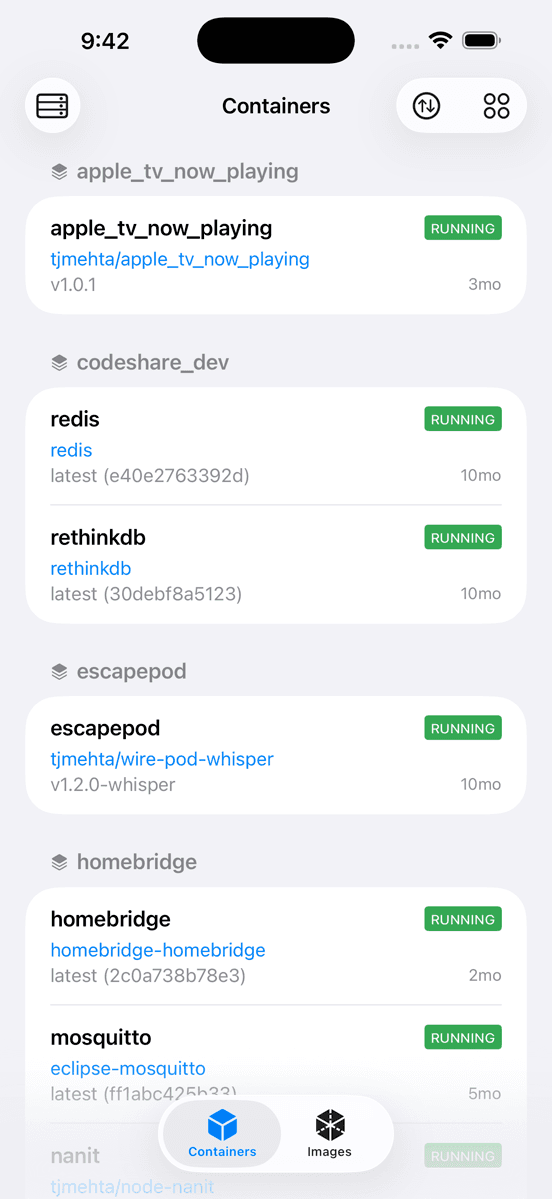
Dockerman is a Docker client for iPhone and iPad. It connects straight to the Docker Engine API on your server, over HTTPS, using the same TLS client certificates the Docker CLI uses.
No Portainer, no agent on the server, no relay in between.
Check what's running, restart a stuck container, or follow its logs from anywhere your phone can reach the server.
- — Containers grouped by Compose project
- — Start, stop, restart and delete containers
- — Live logs with ANSI colours
- — Inspect output for containers and images
- — Images grouped by repository; delete the ones you don't need
- — Several hosts, each with an optional fallback address
- — Hosts and certificates can sync through your own private iCloud
Homelab and self-hosting setups, home servers and NAS boxes, DevOps engineers, sysadmins and developers who run their own Docker hosts and want to check on them away from a terminal.
OTHER WAYS TO MANAGE DOCKER FROM A PHONE.
ServerCat, WhaleDeck and Docker Server Admin
Server monitors that show CPU, memory and container stats. ServerCat and Docker Server Admin connect over SSH, and ServerCat and WhaleDeck include an SSH terminal. Free to download.
Pick one of them if you want server metrics or a shell. Dockerman has neither and does not use SSH.
DockerTab
A Docker manager with live container stats, exec and Compose stack deployment. Free to download.
Pick it if you need exec or to deploy stacks from your phone; Dockerman does neither.
Yomo: Docker & Portainer
One app for Docker, Portainer and Podman hosts, with widgets. Requires iOS 26. Free to download.
Pick it if you already run Portainer or Podman.
Termius
A general SSH client with a full terminal. Free to download.
Pick it if you would rather type docker commands than tap.
ContainerDesk: Docker & K8s
A Docker and Kubernetes manager for Mac, iPad and iPhone that connects over SSH, with live stats, exec, a terminal, a file browser and image pulls. Pro is a one-time purchase. Free to download.
Pick it if you would rather reach Docker over SSH than expose its API over TLS, or you need Kubernetes, stats or a terminal. Dockerman has none of those.
Portainer
A container manager you run as a container on your server and open in a web browser. It manages Docker, Swarm, Kubernetes and Podman. Its Community Edition is free and open source.
Pick it if you want one web dashboard for many hosts, including Kubernetes, and are happy to run it on your server. Dockerman puts no agent on the server; it talks straight to the Docker Engine API over TLS.
Portainer Mobile: Docker Admin
An app from UMEGS for the Portainer API. It connects to your Portainer instances to show live container CPU, memory and network stats; start, stop, restart or remove containers; stream logs; manage images and inspect networks; and run commands in running containers through a terminal. Free to download.
Pick it if you already run Portainer and want stats or a terminal on your phone. Dockerman needs no Portainer, and has neither.
Docker Desktop
Docker's own app for building and running containers on a Mac, Windows or Linux computer, with paid plans that include Docker Desktop Business.
Pick it to run containers on the computer in front of you. Dockerman is for checking and controlling Docker on a server you reach over the network.
Dockerman
A Docker client that talks straight to the Docker Engine API over TLS with your own certificates, with no SSH, agent or relay. See containers grouped by Compose project; start, stop, restart and delete them; follow live logs; and browse images. $9.99 once, with no subscription.
Other apps are described from their own US App Store listings, and Portainer and Docker Desktop from their official websites, read November 23, 2026. Check each source for current features and prices.
SETUP, QUESTIONS, AND PRIVACY.
What do I need on the server?
A Docker daemon with its remote API enabled over TCP with TLS, and the CA certificate, client certificate and client key that go with it. Dockerman connects to that API directly over HTTPS.
Do I need Portainer, an agent or a relay?
No. Dockerman talks to the Docker Engine API itself. Nothing extra runs on your server, and there is no relay service in between.
What can I do with containers?
See every container, grouped by Compose project. Start, stop, restart and delete them, read their inspect output, and follow their logs live with ANSI colours.
What can I do with images?
Browse images grouped by repository, read their inspect output, and delete the ones you no longer need. Dockerman does not pull images.
Can I manage more than one host?
Yes. Add as many Docker hosts as you like, and give a host a fallback address that Dockerman tries when the first one can't be reached.
Can I manage Docker on my home server or NAS?
Yes, if its Docker daemon accepts TLS connections with client certificates on a port your phone can reach, on your home network or through your own VPN.
Can I reach my server over Tailscale?
Yes. Dockerman connects to any address your phone can reach, so while Tailscale is connected on your phone and your server, you can enter the server's Tailscale IP address as the host. Or keep your home network address as the host and add the Tailscale address as its fallback: Dockerman tries the fallback when the first address can't be reached. The Docker daemon must accept TLS connections on that address. Dockerman has no Tailscale settings of its own.
Does it show Docker Compose stacks?
Yes. Containers are grouped by their Compose project, so each stack's containers sit together. Dockerman does not start or stop a whole stack from a Compose file.
Does it work on iPad and Mac?
Yes. It runs on iPhone and iPad, and the App Store lists Dockerman for Mac with macOS 13.0 or later.
Can it connect over SSH or without TLS?
No. Dockerman connects over HTTPS with TLS client certificates only.
Where are my certificates and keys kept?
On your device, in the app's database, with a copy of the client private key in your device's Keychain. If iCloud is on for Dockerman, your hosts, certificates and key also sync through your own private iCloud account.
How much does it cost?
$9.99 on the App Store, paid once. There are no in-app purchases and no subscription.
How do I get help?
Email hello@tjmehta.com.
Privacy policy: offln.dev/dockerman/privacy